
DayZ server
LoadingContacting the Railway API

Secure session
Restoring your secure dashboard session…
Please wait while the command network reconnects.
Survivor command network
Sign in securely with Discord to access your World War Z server, survivor account, trader services and the correct live world map.
Connecting to the World War Z network…
By continuing, you agree to the Terms and acknowledge the Privacy Policy.
Authenticated survivor access
Choose the World War Z community you want to manage. Its configured DayZ world automatically controls every map and coordinate picker.
Your selected server keeps its own balances, faction data, purchases and map settings. You can switch servers later from the dashboard.
Your survivor, progression, faction, quests, events, orders and current priorities in one personalised command centre.
Quickly jump into the most-used WWZ features.
Contacting the Railway API
Live server population
Reading restart schedule
Discord connection required
Main server
Shortcuts
Live operations
Development
Your server-scoped inbox for things that need attention, recent workflow updates and important WWZ notifications.
Everything below is rebuilt from the authoritative WWZ systems for the currently selected server. Chernarus and Livonia remain isolated; read/archive state is private to your account.
Active items need a response. Unread shows updates you have not reviewed. Archived keeps earlier activity out of the way.
Private account workspace
Sign in to load your faction, flag, quest, event, order, ticket and notification activity. Admin queues are only included for authorised staff.
Live public information supplied by the World War Z Bot on Railway.
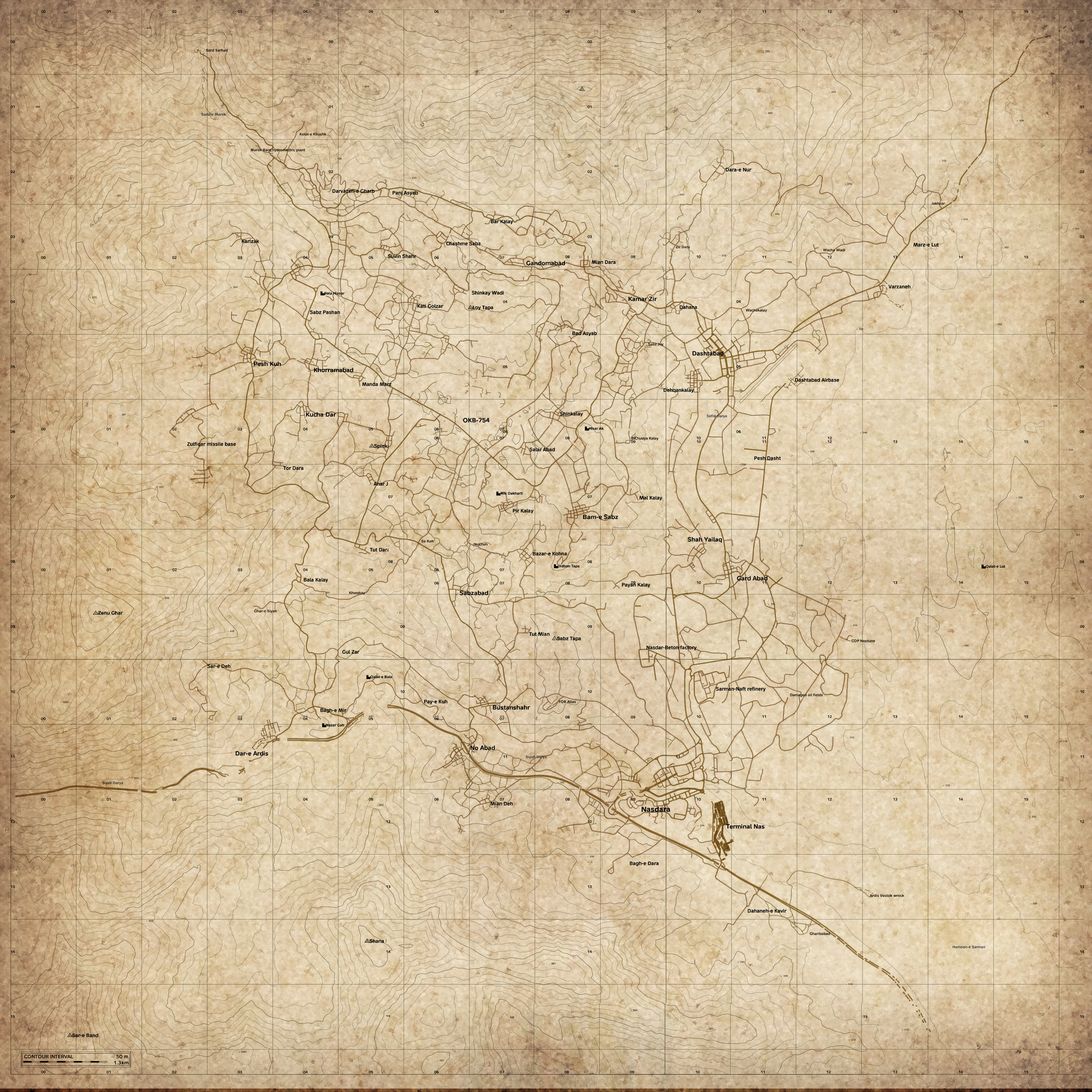
World map workspace
Explore the locally hosted satellite map, manage private pins, view Admin-published public markers, toggle settlement names and copy accurate DayZ X/Z coordinates.
Server details
Live operations
Server connection
Explore the configured server's validated satellite imagery, official labels, shared Admin markers and accurate DayZ X/Z coordinates.
Search a location, drag to move, zoom with the map controls and tap anywhere to select coordinates.
Public markers are shared by WWZ Admins. Your private pins stay separate. Select a location and use the map’s existing Copy button for X/Z coordinates. Changes here do not modify server mission files.
Collaborative map intelligence
Private pins stay browser-only. Group and faction intelligence is returned only to signed-in members of that exact group or faction.
Visibility
Sign in with Discord to access your Group and Faction layers. Public markers and active Kill Zones remain available without sign-in.
Team intelligence
No Group or Faction markers are available to this account on this server.
Restricted layer
iZurvive-style sharing
You are not currently in a map group on this server.
Private pins never leave this browser. Group markers are returned only to that exact group's members, Faction markers only to that exact faction's members, and Admin status does not bypass those private layers. Active Kill Zones are drawn from the server's real configured geometry.
One workspace for privacy-safe server trends, reusable community events, opt-in browser notifications and the installable World War Z app foundation.
Browse the calendar, open an event for its details, and register when sign-ups are available. Your entries are shown in My Registrations.
Sign in with Discord to register for community events.
Notifications are per member and per browser. Nothing is enabled until you grant browser permission and choose topics.
Supported topics: community events, meaningful server-status changes, your ticket replies, PvE/PvP rotations, and your shop/order updates.
Install from a supported browser for an app-like home-screen experience, offline shell and push notifications.
The repository includes repeatable web packaging and native sync commands without duplicating website source by hand.
Google Play / Apple publication only needs developer-account signing, store metadata and review when you choose to publish.
The web/PWA remains the canonical product. Native wrappers are generated from the same release so features do not fork.
Templates fill the rules, rewards, announcement defaults and event behaviour for you.
Manage lifecycle, Discord cards, updates, attendance and results from one place.
Choose an event above to check in players, manage teams and scores, publish standings and separately approve rewards.
Browse the shared World War Z flag catalogue, see this server's independent ownership, and request one flag for yourself or your group.
Shared catalogue
Administration
Approve claims and transfers, link registered factions, review inactivity, maintain private notes and keep Discord synchronized.
Claim queue
Transfer queue
Manual assignment
Activity
Discord routing
Loading publication state…
Claim monitoring
Inactive claims are review-only and are never revoked automatically.
Special flags
These designations are independent for Chernarus and Livonia and can be changed or removed at any time.
Active ownership
Linked inactivity is highlighted for review. Staff notes remain private and never appear on the public flag page.
Audit trail
Live Chernarus Trader availability, local-time status updates and direct World War Z map access. Admin controls use the same Discord announcement system as /trader.

Trader access
Members can use this page to check whether Radio Zenit is currently accepting trades. Open/Closed changes are stored in UTC, displayed here in your local time and announced in Discord.
Admin controls
Run /trader announcechannel once in Discord and choose the main chat. Website Open/Close controls will then send the same @everyone announcement there.
Admin history
No Trader status changes have been recorded yet.
Chernarus-wide PvE progression: Survivor Passport exploration, per-life survival records, multi-stage operations, reputation, campaigns, expeditions and map intelligence — all built from console-safe ADM telemetry.
Permanent exploration progression
Every location is unlocked only when a periodic ADM position places your linked PSN inside its real Chernarus area. Death does not erase permanent discoveries.
One-life survival telemetry
Offline time is not counted. Death, suicide or PvP ends the current life; reconnecting does not create fake survival time.
Multi-stage no-death missions
Operations progress automatically and in order from console ADM coordinates. Dwell stages require continued tracked presence; dying fails every active one-life operation.
Three concurrent community objectives
Distance, exploration, expedition participation and operation completions all contribute using console-safe telemetry.
Existing WWZ factions
PvE reputation is credited to the survivor's faction membership at the moment it is earned.
Exploration and survival progression
Quarterly honours
Admin-only evidence-based balancing
This does not auto-edit the mission. It identifies underused objectives, overly difficult operations and performance pressure so CE changes can be made from evidence rather than blind global inflation.
Rotating fenced military PvP areas
Server-wide cooperation
Rolling expedition participation
Rankings use periodic expedition check-ins and first visits. DayZ console ADM logs do not expose authoritative infected or animal kills, so NPC-kill inference is not used.
Seasonal honours
Faction competition
Expedition participation is credited to the survivor's existing WWZ faction membership at the time each periodic ADM check-in is recorded.
Objective participation
Scoring model
Existing factions stay authoritative. Changing faction later does not rewrite historical PvE credit, and unlinked players still contribute to community goals without receiving account rewards.
Expedition geography
The collaborative Chernarus map highlights the exact active fenced military PvP expedition polygons plus their participation heatmap.
Latest ADM activity
Rotation pool
The rotation uses the same seven managed fenced military PvP polygons as the Chernarus Kill Zone system: NWAF, VMC, Zeleno, Balota, Kamensk, Krasno and Tisy.
Live Full PvP combat, competition and Admin intelligence for the 26-slot World War Z Livonia server.
Deathmatch server rotation
Rotation is currently disabled.
Live combat zones
Faction warfare
Rolling competition
Livonia kills are mirrored into this analytics view without replacing the existing canonical PvP statistics.
Combat records
30-day weapon meta
Combat geography
The collaborative Livonia map has a separate PvP Heatmap layer based on confirmed kill locations.
Faction vs faction
Automatic kill-streak pressure
Mission-side PvP ecosystem
Admin intelligence
Risk-ranked informational flags only. No automatic punishment is performed.
Admin intelligence
Repeated kills inside current fresh-spawn bubbles. Informational only.
Livonia-only restart-driven JSON profile rotation. Automatic activation stays off until a valid arena profile and the Livonia mission root are ready.
Automation
The worker stages the next validated profile before the scheduled Livonia restart, verifies uploads and promotes it after the restart.
Restart state
Profile library
Each arena stores its presentation plus the relative JSON files that must be overwritten at restart.
Profile editor
Audit trail
Profile edits, staging, activation, rollback warnings and configuration changes are recorded here.
Admin-only circular and polygon zones with continuous base-radar pings, event filters, allowlists and optional automated enforcement.
Server-wide PvP policy
Configured PvP KILLZONE alerts and enforcement are active for this server.
No recorded changeNo zones match the current search and filters.
Zones are stored separately for each configured server/map. Switching between Chernarus and Livonia loads only that server's records.
Player positions are available only to currently verified Admins/Owners and are never published on the public interactive map. Current map: DayZ.
Route supported DayZ ADM activity into one or more Discord channels with custom formatting and player allow/ignore lists.
No server feeds match the current filters.
The feed selectors are generated by Railway from events the WWZ parser can actually detect. Standard feeds include the detailed DayZ telemetry available for the event, including coordinates/location context where the ADM log provides it.
Search current bot command groups and direct command paths by name, description or category.
No bot commands match your search.
Live wallet, protected bank savings and economy statistics belonging only to the signed-in member.
Personal account required
Sign in to securely load your own verified wallet. Other members' account data is never returned by this page.
Use /account link in Discord with your exact PlayStation ID, then join the DayZ server to complete verification.
Live verified balance
Current shared prize
Current underworld heat
Consecutive claims
Protected savings
Spendable cash
Protected savings
Wallet + bank
The Survivor Shop lets you choose Cash / Wallet or Protected Bank at checkout. Other spending may require wallet cash; withdraw savings when needed.
Bank-to-bank player transfers are available through /economy bank transfer in Discord. The transfer stays inside the selected server economy.
Savings ledger
No bank transactions have been recorded yet.
Shared server funds
Contributions move from your protected WWZ Bank into the selected server treasury. Admin grants, corrections and escrow reservations are fully audited.
Community ledger
No community treasury activity has been recorded yet.
Admin controls
Use adjustments only for corrections or initial funding. Grants pay verified survivors directly into protected bank savings. Escrow reserves available treasury funds until release or refund.
Escrow reserve
No active escrow reservations.
Lifetime ledger
Your ledger
No economy transactions have been recorded yet.
Spend your verified community balance on approved DayZ goods and services.
Use the dedicated member-facing shop for catalogue browsing, purchases and private order history. Open Survivor Shop.
Purchases create an economy transaction and a protected delivery order. Railway prepares normal Items and Event Items automatically for the next restart, while ticket-created trader orders remain a separate manual workflow.
No active shop items match your filters.
The survivor shop is temporarily unavailable.
Storefront checkout
Combine up to 25 normal catalogue products in one checkout. Each item can be purchased in quantities up to 50. Rentals remain separate with 1–30,000 restart terms.
Private purchase history
Railway returns only orders attached to your own verified Discord and PlayStation account.
Use /link in Discord, then refresh the shop.
You have not placed a shop order yet.
Save real Chernarus X, Y, Z and rotation values under names you can reuse for future trader and event-item orders.
Locations are not restricted to preset zones. Select a clear, safe area and verify the coordinates before ordering. Railway rejects malformed or out-of-bounds spawn points before any file is changed.
Named coordinate
Private location book
No saved delivery locations yet.
Saved locations are temporarily unavailable.
Railway prepares normal items and restart-bound Event Items automatically, validates and backs up the required mission files, and updates each order as restarts occur.
Normal Items use temporary cfgEffectArea.json entries at the buyer-selected X/Y/Z, matching the current working DayZ++ console method. After the next restart, Railway removes only its own ItemWWZOrder... entries. Event Item rentals keep their restart-bound events.xml, cfgeventspawns.xml and cfgspawnabletypes.xml workflow. Every changed mission file is validated, backed up, uploaded and checksum-verified automatically.
No automatic shop orders match this scope.
The automatic order monitor is temporarily unavailable.
Read live mission files, validate proposed changes, inspect exact diffs and deploy through the existing backup-and-rollback engine.
Mission service
No recent action loaded.
Deployment safety
Purpose-built live controls
These controls use the existing gameplay, weather, messages, loot and event validators. Preview never writes. Apply creates backups, uploads through Nitrado and checksum-verifies the result.
Loading structured configuration…
No structured change preview generated.
Live Nitrado mission files
No diff generated.
Central Economy
| Event | Children | Population | Positions | State |
|---|
No events match this search.
Event configuration is temporarily unavailable.
Live DayZ identity, activity and PvP statistics for the signed-in Discord member only.
Private Member Profile
Railway matches your verified Discord identity to your own PlayStation survivor record. The browser cannot choose another member ID.
Use /account link in Discord with your exact PlayStation ID, then join the DayZ server to finish the live verification.
Connected Discord account
@account · Member · Joined Discord —
Verified survivor
Offline · Linked —
Tracked from ADM sessions
Recorded server joins
0 kills · 0 deaths
0 flags captured
Community progression
—
Survivor activity
PvP intelligence
Your rotating quests, lifetime objective career, rewards, streaks, bounties and public contracts — tracked from real World War Z activity.
Private survivor progression
Your quest rotation and progress are tied to your verified Discord ↔ PlayStation survivor link.
Use /account link in Discord, verify your PlayStation ID and then return here.
Daily rotation
Weekly rotation
Permanent objective record
Progress requires contributions from multiple survivors. These are community goals, not proof of squad proximity or a separately rewarded event.
Short rotation
No daily quests are available.
Long rotation
No weekly quests are available.
Player-funded targets
No active bounties.
Your target history
No bounty records involve your survivor yet.
Public objectives
No survivor contracts are available.
Your accepted work
You have not accepted any contracts.
Permanent record
Quest history will appear after your first rotation.
Create public contracts, close active objectives and review live quest rotation state.
Quest intelligence
Nasdara · live quest claims
Read-only staff verification of shared quest goals. Records are based on claimed quests; this does not prove group attendance or automatically pay rewards. Use the existing Event Planner and Event Desk to organise and verify optional prize events.
New public contract
Live records
Manage the persisted Daily and Weekly quest rotation without mixing Owner settings into the member objective workspace.
Owner rotation controls
Faction applications, invitations, leaders, officers, roster management, linked flag claims, contracts, bounty activity and an audited faction bank — all scoped to the selected server.
Faction network
Faction membership is tied to your verified Discord ↔ PlayStation survivor identity.
Already invited? Review your invitations. Looking for a group? Browse the directory. Want to lead? Request a faction for Admin approval.
Your Discord account must be linked to your PlayStation identity. Membership, recruitment and treasury data belong to the selected WWZ server. Faction requests require Admin approval.
Your membership
You are not currently assigned to a faction.
Faction registration
Submit a faction request without copying a template into Discord. Your verified linked PlayStation ID becomes the faction leader after Admin approval.
Your inbox
No pending invitations.
Recruitment
No faction applications yet.
Faction command
No pending applications or invitations.
Any faction member can contribute from protected savings. Leaders and officers can disburse treasury funds only to verified members of the same faction.
No faction activity has been recorded yet.
No factions have been created yet.
Faction information is temporarily unavailable.
Administration
Applications, invitations, promotions, leadership transfers, rename approvals, suspension, private Admin notes and faction-treasury adjustments are persisted to the selected server only.
The public panel provides Request A Faction, My Faction and Browse Factions buttons. Requests are sent to the selected review channel with Accept / Decline controls.
No faction creation requests are awaiting review.
No applications are awaiting review.
No rename requests are awaiting review.
No factions exist yet. Create the first faction to begin.
Discord and the dashboard use the same Railway ticket records and the same private Discord channels. Ticket channels are restricted to the creator, the configured Admin role and the bot.
A dashboard-created ticket opens a real private Discord ticket channel. Discord claims, closes, tags, notes, transcripts and ratings update the same Railway record read by this page.
Private support records
Connect Discord to open tickets and view only your own support history.
Open a private request with a subject and details. Then find it in your ticket history to read updates and reply through the linked Discord thread.
Your request is associated with a private Discord channel. Use My Tickets to view its current status and reply. Only authorised participants can access the ticket; closing and reviewing are handled by the existing ticket system.
Your synchronized records
You have not opened a support ticket yet.
Support tickets are temporarily unavailable.
Admin synchronized operations
Manage the exact same tickets and Discord channels used by the bot commands.
Permanent Railway records
No tickets match this view.
Ticket administration is temporarily unavailable.
Selected synchronized ticket
Select a ticket to inspect its history, private staff notes, archived transcripts and live Discord state.
Additional participants are disabled. The ticket channel permission set is re-enforced automatically by the bot.
Support performance
No closed-ticket staff history yet.
Abuse protection
Owner configuration
Manage the existing synchronized Discord + website ticket system without rebuilding it. Infrastructure controls publish the panel and channel routing; advanced policies apply live to new and existing tickets where appropriate.
Panel location, ticket categories, transcript archive and the default Admin support role.
Control closure, claiming, reviews, inactivity and transcript behaviour. Staff permissions remain enforced by the bot/API.
Updates the existing Discord ticket panel in place. This does not create a competing panel or ticket engine.
Enable categories individually and optionally override the default support role, notification role and initial priority. Ban Appeals remain linked through the moderation appeal workflow.
View only your own eligible cases, submit an appeal and follow the protected review outcome.
Private member records
Railway verifies your Discord identity and returns only moderation cases attached to your own linked account.
Use /link in Discord with your exact PlayStation ID, then return here and refresh.
Explain the case honestly and include relevant evidence.
Available actions
No moderation cases are currently eligible for a new appeal.
Your history
You have not submitted an appeal.
Your appeals are temporarily unavailable.
Community progression across Discord activity, voice participation, DayZ combat, events, quests, bounties and contracts.
Eligible Discord, DayZ combat, events and challenges contribute to your progression when enabled for this server. Track your next milestone below.
Connect Discord to load your current level, prestige, XP sources and server rank.
Your survivor progression
🩸 Prestige 0 — Survivor
Activity record
Real XP ledger
No XP source events have been recorded yet.
Objectives contribution
Complete your Daily and Weekly quests to build your objective career.
XP ledger
No XP activity has been recorded yet.
Achievements
Prestige record
No Prestige milestones recorded yet.
Community
No progression activity has been recorded yet.
Railway rechecks your current Discord Admin/Owner access before every save. Changes apply to the existing progression database without resetting member XP.
Progression configuration
Save XP rates, economy rewards, announcement settings, every visible level/prestige role binding and channel exclusions in one action.
Core controls
Rates & anti-farming
Discord role automation
Finds the existing official Lvl/P prestige roles and the four existing WWZ header/footer roles by name, binds every milestone, arranges the progression block and updates every non-bot member to their current Level/Prestige roles. Sync never creates Discord roles. The bot role must sit above the progression block.
Level ladder
Prestige ladder
Anti-farming controls
Protected player moderation, economy administration and server operations for verified Admins.
Railway rechecks your current Discord membership and Admin or Owner access before every player search, moderation action and server operation. All player changes require a recorded reason and an explicit confirmation for the selected player.
Choose a task to open its existing WWZ control. Operational actions remain protected by Discord permissions and existing confirmation steps.
Discord ↔ PlayStation identity
Configure the Verified role and automatic linked-PSN nickname synchronisation for the currently selected World War Z server. Chernarus and Livonia keep separate Discord-role settings.
Changing the selected server changes the identity configuration shown here. Bulk all-server resync uses each server's own saved Verified role and nickname policy; role IDs are never copied between Discord servers.
“Resync Both Servers” is available only when your Discord account has Admin access to every configured World War Z server. It does not change either server's saved settings.
| Server | Members | Verified role | PSN nickname | Missing |
|---|
Live operational intelligence
Your all-in-one administration hub for live DayZ health, Discord security, moderation, feeds, players, factions, flags, events, commerce, backups and protected server operations. Specialist workspaces remain available one click away for deeper management.
All-in-one administration
Discord anti-spam & anti-raid
Each Discord server keeps its own thresholds, alert destination, exempt roles and emergency quarantine state. Protection never mirrors settings between Chernarus and Livonia.
Recent detection history
No anti-spam or anti-raid events have been recorded for this server.
Prioritised signals
No current operational conditions need Admin attention.
Live activity
No tracked online players or recent objective claims are available.
The Command Centre is temporarily unavailable. Use Refresh Overview to try again.
Unified enforcement & case operations
One server-scoped workspace for active warnings, Discord timeouts, Discord and DayZ bans, reviews, appeals, staff watchlist entries, private notes and numbered case history.
Railway rechecks your current Admin access on every request. Chernarus and Livonia remain isolated, and raw Discord IDs, Nitrado credentials and internal identifiers are never exposed here.
Fast player administration
Search to open a protected Player Intelligence dossier.
Specialist workspaces
Prioritised case work
No active cases currently need operational attention.
Current punishments
No active warnings, timeouts or bans are recorded.
Staff monitoring
The selected server watchlist is clear.
Private context
No recent private staff notes are available.
Permanent moderation history
No moderation cases have been recorded for this server.
The Moderation Centre is temporarily unavailable. Refresh the centre to try again.
Daily moderation operations
Prioritise active cases, assign a reviewer and set an internal deadline. Assignment changes create linked audit cases and never rewrite the original moderation record.
No active cases currently require operational attention.
The moderation queue is temporarily unavailable. Use Refresh queue to try again.
Moderation case management
Warnings, bans, evidence, reviews and appeals remain attached to numbered cases. Switch to Recent cases to review resolved or expired records. Railway processes due temporary unbans automatically and preserves every review outcome.
No active moderation cases are recorded.
Moderation cases are temporarily unavailable. Use Refresh cases to try again.
Live Enforcement State
Read the current Discord and Nitrado DayZ ban lists directly from their live services. DayZ bans are isolated to the selected World War Z server and are never intentionally mirrored to the other DayZ server. Entries created outside the dashboard remain visible but may not have a numbered case or linked expiry.
DayZ ban list scope: selected server.
Discord Enforcement
No Accounts Are Currently Banned From Discord.
The Discord ban list is temporarily unavailable.
Nitrado Enforcement
No PlayStation IDs Are Currently Banned From DayZ.
The Nitrado DayZ ban list is temporarily unavailable.
Ban Lists Have Not Been Refreshed During This Session.
PSN or Discord display name
No database-wide listings
Confirmation and audit required
Unified survivor intelligence
Searches are limited to 15 matches. The dossier joins server activity, ADM counters, faction and flag links, progression, PvP, economy, moderation, tickets, objectives and staff history without exposing raw Discord IDs, DayZ UIDs, positions or credentials.
No matching player records were found.
Player search is temporarily unavailable.
Protected player record
This PlayStation ID exists in the DayZ activity registry but is not linked to a verified Discord account. Linked profile, playtime and moderation data are unavailable.
Player identity
Offline · Unlinked
ADM intelligence
Community links
Staff context
No staff watchlist entry.
Tracked ADM sessions
Recorded joins
0 kills · 0 deaths
Current moderation count
Verified linked wallet
Current progression level
Current prestige tier
Recorded event victories
Protected player controls
Cross-system chronology
One server-scoped view across combat, progression, economy, moderation, support, objectives, factions and flag activity.
No activity matches this filter.
Activity
PvP intelligence
Progression
Survivor profile
Progression ledger
No XP events have been recorded.
Event administration
No event-win adjustments have been recorded.
Combat timeline
No recent confirmed PvP records are available.
Economy intelligence
No recent economy transactions are recorded.
Support history
No support tickets are recorded for this member.
Commerce history
No shop orders are recorded for this member.
Objectives
No bounty or contract activity is recorded for this member.
Private staff record
No private staff notes have been added.
Active moderation
No active warnings are recorded.
Moderation history
No moderation records have been recorded for this linked account.
Nitrado enforcement
No DayZ ban actions have been recorded.
Permanent audit
No dashboard player actions have been recorded.
Admin operations
Admin operations · No destructive actions
Prepare Badlands as a fresh world while keeping Chernarus economy, progression, factions and map data untouched. Livonia remains independent.
Checks required before replacing the primary Chernarus world. Read-only: this section never updates Nitrado, Discord, roles or gameplay records.
No automatic activation. Use the private launch runbook and verified backups.
Loading world profiles…
Read-only inventory of Bot-owned messages recorded when WWZ publishes or updates them. Historical messages are not automatically registered; no Discord messages are edited by this tool.
Checks current Discord message existence, author and Bot channel permissions. Limited to 25 known registrations per request. Does not publish, edit or delete messages.
Not checked. Click to perform a live, temporary Discord verification.
These actions are suggestions derived only from saved publication metadata, not live Discord permission or ownership checks. Chernarus-only Trader coordinates and historical event content must never be relabelled as Badlands.
Refresh and activation are locked pending verification, permissions, approvals and rollback testing.
Release v2.19.0: owner-confirmed Badlands runtime authorization uses exact Nitrado mission matching, separate SQLite integrity checks and the journalled Discord role cutover. Backups, map assets, rental settlement and rollback still require independent verification before enabling the primary runtime.
Stage 2D Phase 4 adds manual live Discord message existence, authorship and permission checks for registered panels. These diagnostics do not authorise edits. Refresh execution, historical imports, gameplay migration and activation remain blocked.
Checking staged world data…
Staged storage is not production integration. The migration cannot activate until all domains are safely routed and tested.
Check one Discord account against the existing Chernarus progression and the independent Badlands staging record. Missing Badlands accounts display Level 1, zero XP and fresh balances. Staging data is for testing, not the final launch dataset.
Checking read-only world routing capability…
Blocking checks prevent premature activation. Readiness is not proof of a verified external backup.
Checking outstanding deliveries…
Stage 2C Phase 2 previews both directions. Admins may fetch the full Discord roster and store deduplicated dry-run jobs for review. No role edits, accounts or world profiles are changed.
Checking managed role bindings…
Fetches all guild members and stores a read-only plan for review. This may take time and requires Discord Members intent. It will NEVER add or remove roles. Plans do not automatically execute.
Role execution remains locked. No full-roster dry runs saved yet.
Protected Admin, Verified, donor, moderation, Livonia and unrelated roles are never targeted. Full guild fetch, permission preflight, retries and activation remain disabled.
Only available while the primary world is in Badlands quarantine. A fresh complete Discord roster is checked before changing only the configured progression, prestige and faction roles. Protected and Livonia roles remain untouched. Each operation writes a private rollback journal first.
MIGRATE BADLANDS ROLES
No Discord roles have been changed by this control.
This control does not switch Nitrado, edit data, rename channels, or start gameplay immediately. It requires a completed Discord role journal, healthy separate SQLite databases and confirmation that Nitrado is actually running your exact Badlands mission. Authorizing prepares the next Bot restart only.
Confirm each item only when independently checked. The Bot can verify the Nitrado mission, local databases and role journal itself; it cannot certify off-server backups or in-game map positions for you.
No runtime authorization has been prepared here.
Admin command, health & permanent history
One server-scoped workspace for live DayZ/Nitrado state, population, protected controls, restart intelligence, Railway/Discord health, ADM monitoring, background workers, operational failures and the permanent cross-system audit.
Railway is verifying the selected server and protected monitoring state.
Protected Nitrado controls
These are the same protected start/stop/restart actions used elsewhere in the dashboard. Railway rechecks Admin access, current state and confirmation before submitting anything to Nitrado.
Fast Admin navigation
Order fulfilment intelligence
Monitor normal item purchases and restart-based rentals separately. Retry or refund an order only from the existing protected Delivery Manager, where its full history and confirmation controls are available.
Waiting for a live snapshot.
Waiting for a live snapshot.
Read-only status. No orders will be retried or modified by opening this page.
Live service state
Background runtime
Restart intelligence
ADM intelligence
Actionable monitoring
No active operational health signals. The selected server is stable.
Failures & exceptions
No recent operational errors are recorded.
Restart-safe operational ledger
Operational history will appear after a meaningful health transition or detected server restart.
Operations telemetry is temporarily unavailable. Use Refresh Centre to try again.
Protected cross-system audit
Search one sanitized history across operations, moderation, player administration, Nitrado server controls, configuration writes, shop catalogue administration, tickets, objectives, factions and notification routing. Raw Discord IDs, secrets and internal metadata remain on Railway.
No audit events match the selected filters.
Audit history is temporarily unavailable. Use Refresh Centre to try again.
Ticket-created in-game trader queue
Process paid manual trader-ticket orders, record in-game fulfilment, or return the full purchase amount. Refund and cancellation actions restore finite stock and create a linked economy transaction.
No manual trader-ticket orders match this view. Website and Discord purchases are delivered automatically.
Shop orders are temporarily unavailable.
Single-source community policy
Admins and the Owner can maintain the live rules once, then publish the same ordered revision to Discord and the public website.
WWZ splits oversized sections only between complete rules, preserves section order, and replaces only messages previously published by WWZ. Manual messages in the rules channel are never deleted.
Rules Manager is temporarily unavailable.
Managed Discord economy information
Replace manual Shop, price, income and economy-information messages with server-scoped WWZ panels that can be refreshed from the live catalogue.
Item and vehicle prices are generated from the selected server's current Shop Administration catalogue. Chernarus and Livonia routing, publication state and optional Trader information remain completely separate.
Economy Panels are temporarily unavailable.
Structured community support catalogue
Manage optional donation items, packages, payment information and the exact ordered embeds published by World War Z.
AUD remains authoritative. WWZ automatically splits oversized content at complete entry boundaries and replaces only donation messages it previously published. Manual messages are never deleted.
Catalogue presentation
Single item purchases
Bundled supporter tiers
Package benefits are structured as catalogue items, Discord roles, shop discounts, Discord currency or custom benefits so eligible parts can be automated later.
Checkout guidance
Donation Manager is temporarily unavailable.
Donation commerce workflow
Review external payment proof, synchronize private purchase tickets and track every automatic or manual benefit through completion.
World War Z never collects card details. PayPal/Nitrado remain responsible for payment processing; Admin approval is required before fulfilment begins.
No donation orders match this view.
Donation orders are temporarily unavailable.
External service recovery
Failed automatic unbans and Discord notification deliveries remain visible until resolved. Retrying does not duplicate the original punishment or close the failure before the external service confirms success.
No unresolved moderation operations are recorded.
Operational failures are temporarily unavailable.
Manage the catalogue, restart-bound event profiles, member access, global limits and role discounts without mixing Owner tools into the member shop.
Members browse and purchase on shop.html. Catalogue writes, access rules and discounts stay inside this Owner-only workspace and are rechecked by Railway.
Catalogue scope
Reads the server's live types.xml and vehicle events, adds missing shop entries with WWZ default prices, preserves existing item edits and keeps rental vehicles at $1 per restart.
Sync filtering
Prevent helper, unwanted or staff-only DayZ classnames from being imported again. Exact classnames and */? wildcards are supported.
No catalogue sync exclusions are configured.
WWZ seeds exclusions for Splint*Applied*, ChemLight* and PartyTent*. Matching source-backed catalogue entries are hidden when exclusions are applied; removing an exclusion does not automatically re-enable a deliberately hidden item.
Configure player-facing names, DayZ class types, categories, local/global scope, prices, stock and purchase limits. Existing orders keep their original audit details.
Batch editing
Apply one guarded change to explicitly selected regular items. Existing orders keep their original price and audit snapshot.
Rental/event prices are intentionally excluded from bulk pricing and remain protected at $1 per restart. Bulk changes never rewrite completed or active order snapshots.
| Select | ID / Item | Category | Scope | Price | Stock | Limits | Status | Action |
|---|
No regular shop items exist yet.
Shop configuration is temporarily unavailable.
Restart-Bound Catalogue
Event profiles generate a unique template-family name such as VehicleWWZOrder000001 using the buyer's exact coordinates. Attachment and cargo profiles in cfgspawnabletypes.xml are classname-wide and may affect other Central Economy spawns of the same class.
| ID / Item | Category | Classname | Price / Restart | Restarts | Approval | Status | Action |
|---|
No event-delivery items are configured.
Owner-managed commerce settings
Required
Member-facing
Required
Each Event Item profile may narrow this range further. The global maximum can never exceed 30,000.
Optional
The best matching active discount is applied automatically and audited on the order. Percentage and fixed-value discounts are supported.
No role discounts configured.
Back up, validate, compare and restore DayZ configuration files safely.
Destructive actions will require a confirmation, permission check, fresh backup and permanent audit record.
Live restore-ready history
Every restore rechecks Owner access, validates the stored checksum, creates a recovery backup of the current live file when needed, uploads the selected version and verifies the result. Restores do not force a restart.
| Backup | File | Created | Created By | Validation | Actions |
|---|
No matching configuration backups exist yet.
Configuration backup history is temporarily unavailable.
Select Compare to inspect a stored backup against the current live Nitrado file.
Owner-managed Discord audit routing
Railway verifies Owner access and asks the bot to save, test or disconnect each route. Raw Discord channel IDs remain server-side.
| Log name | Log channel | Connected | Action |
|---|
No Discord log types match this search.
Discord logging configuration is temporarily unavailable.
Owner-managed Discord routing
Select a Discord text channel and Railway asks the bot to create the incoming webhook. The website never receives a webhook URL or token, and the database stores only the Discord webhook ID and routing metadata.
New destination
The bot requires Manage Webhooks and Send Messages access in the selected channel.
Managed destinations
No managed webhook destinations exist yet.
Per-event routing
Routes use WWZ-managed webhook destinations created above; Discord channels do not appear here until a managed webhook exists.
Protected audit
No webhook configuration actions have been recorded.
Webhook configuration is temporarily unavailable.
Main-bot utilities
Replace the remaining general-purpose Discord utility bots without exposing webhook tokens or allowing dangerous role assignment.
Embed publishing uses your existing managed WWZ webhooks, sticky messages only replace the bot's own previous copy, and self-role panels can only offer safe roles below the bot.
Webhook publisher
Create or test webhook destinations first under Notifications & Webhooks. Tokens never reach the browser.
Persistent channel notice
No sticky messages configured.
Member self-service
Hold Ctrl while clicking to select multiple roles. Administrative, moderation, managed and above-bot roles are never offered.
No self-role panels configured.
Community tools are temporarily unavailable.
Discord community
Configure safe automatic join roles, public welcome messages, optional welcome DMs and leave messages. The existing Linked role remains separate and is still granted only after PlayStation account verification.
The dashboard only offers roles below the bot that do not contain moderation or administrative permissions. Bots are ignored, and a closed DM can never block onboarding.
Automatic roles
Hold Ctrl while clicking to select multiple roles. Staff, managed and otherwise privileged roles are intentionally excluded.
New members
Departures
Templates
Persistent storage & recovery
Inspect SQLite health, create verified whole-database backups, generate server-isolated exports and review recovery readiness without exposing Railway storage paths.
Raw SQLite backups cover the complete shared Railway database. Logical exports are filtered to the currently selected WWZ server.
Whole Railway database
Uses SQLite's online backup API, then performs a checksum and PRAGMA quick_check before the file becomes downloadable. The backup contains all configured WWZ servers.
Recovery guardrail
The dashboard never overwrites the active SQLite database while the bot is running.
Verify and download the intended backup first. Stop the Railway service before replacing the persistent database. This centre deliberately provides no live one-click restore.
Selected-server logical export
All allowlisted server-scoped WWZ tables plus linked survivor identity rows.
Persistent recovery copies
| Backup | Created | Size | Integrity | Schema | Actions |
|---|
No database backups have been created from this owner context yet.
Server-isolated downloadable reports
| Export | Dataset | Rows | Created | Size | Actions |
|---|
No generated exports are currently retained.
Permanent audit trail
No data-management actions have been recorded yet.
Owner configuration
Control who can appeal, the submission deadline and which Discord category and role receive linked appeal tickets. Raw Discord IDs remain on Railway.
Connection status, privacy information and answers about the dashboard.
Account
Discord sign-in securely verifies your World War Z membership and current access level.
Read the legal and privacy informationAccess levels
Questions
Controls are enabled only when the signed-in account has the required live Discord access and the selected server, player, case, order or file is in a safe state. Owner-only operations stay hidden from Admins, and Railway repeats permission, target and confirmation checks before every protected write.
Server status, population, map and platform are public and live. After sign-in, personal profiles, PvP, economy, shop orders, saved locations and eligible appeals come from Railway. Verified Admin and Owner workspaces read protected player, moderation, ban, logging, shop, delivery and configuration data from the same service.
Only a signed-in Admin or Owner can see them. Railway rechecks current Discord membership, permissions and the selected target after the confirmation prompt. Owner and self-target protections remain server-side, and every accepted or rejected request is audited.
The public interactive map uses the configured server's locally processed satellite tiles and approved public POIs. It never shows live players, private bases, Admin locations or unpublished events. A separate protected Admin-only Online Players workspace can display recent cached ADM positions.
